

Overview
The CF7 to Gravity Forms Migrator makes it easy to move your existing Contact Form 7 forms into Gravity Forms without rebuilding them from scratch. In just a few clicks, you can scan your site, preview your forms, and import them into native Gravity Forms while preserving key form settings like fields, notifications, and confirmations.
Key Features
- 🔁 One-Click Form Migration: Import Contact Form 7 forms into Gravity Forms individually or all at once.
- 🧠 Smart Field Conversion: Convert common Contact Form 7 field types into their Gravity Forms equivalents automatically.
- 👀 Preview Before Importing: Review mapped fields, mail settings, warnings, and raw form markup before migration.
- 🧩 Preserves Important Settings: Carry over required fields, placeholders, default values, CSS classes, IDs, file restrictions, and number ranges.
- 📬 Notification & Confirmation Migration: Convert Contact Form 7 mail settings into Gravity Forms notifications and success messages into confirmations.
- ⚙️ Built for Gravity Forms: Uses the Gravity Forms framework to create fully native Gravity Forms forms ready for editing and use.
How It Works
- Install and activate the plugin
- Go to Forms > CF7 to GF in your WordPress admin
- Scan your site for existing Contact Form 7 forms
- Preview a form to review the mapped fields and settings
- Import a single form or use Import All to migrate everything at once
- Open the imported form in Gravity Forms and make any final adjustments if needed
Please log in to access this content. Log in
Requirements
- WordPress 5.0+
- PHP 7.4+
- Gravity Forms 2.5+
- Existing Contact Form 7 form data in your WordPress database
Changelog
0.1.0-alpha.2
2026-07-22
- Fixed imported fields showing a duplicated label and placeholder when the source Contact Form 7 field only used a placeholder (no visible label); the label is now kept for accessibility but hidden visually when it just repeats the placeholder text.
- View more
0.1.0-alpha.1
2026-06-15
- Initial release.
- View more
Documentation
CF7 to Gravity Forms Migrator Documentation
The CF7 to Gravity Forms Migrator plugin helps you move existing Contact Form 7 forms into Gravity Forms with just a few clicks.
Key Features
- Scan your site for existing Contact Form 7 forms
- Import forms one at a time or all at once
- Preview forms before importing
- Convert common Contact Form 7 field types into Gravity Forms fields
- Preserve required field settings, placeholders, default values, CSS classes, and IDs
- Convert Contact Form 7 mail settings into Gravity Forms notifications
- Convert Contact Form 7 success messages into Gravity Forms confirmations
- Detect quiz fields and import them as native quiz fields when the Gravity Forms Quiz Add-On is active
- Fall back to plain text fields for quiz fields when the Quiz Add-On is not installed
Requirements
- WordPress 5.0+
- PHP 7.4+
- Gravity Forms 2.5+
- Existing Contact Form 7 form data in your WordPress database
Optional Requirements
- Contact Form 7 active in WordPress for easier form discovery in the admin
- Gravity Forms Quiz Add-On (Elite license) for native quiz field conversion
Installation
- Upload the plugin to your
/wp-content/plugins/directory, or install it using your preferred deployment workflow. - Activate the plugin from the WordPress Plugins screen.
- In WordPress, go to Forms → CF7 to GF.
Using the Plugin
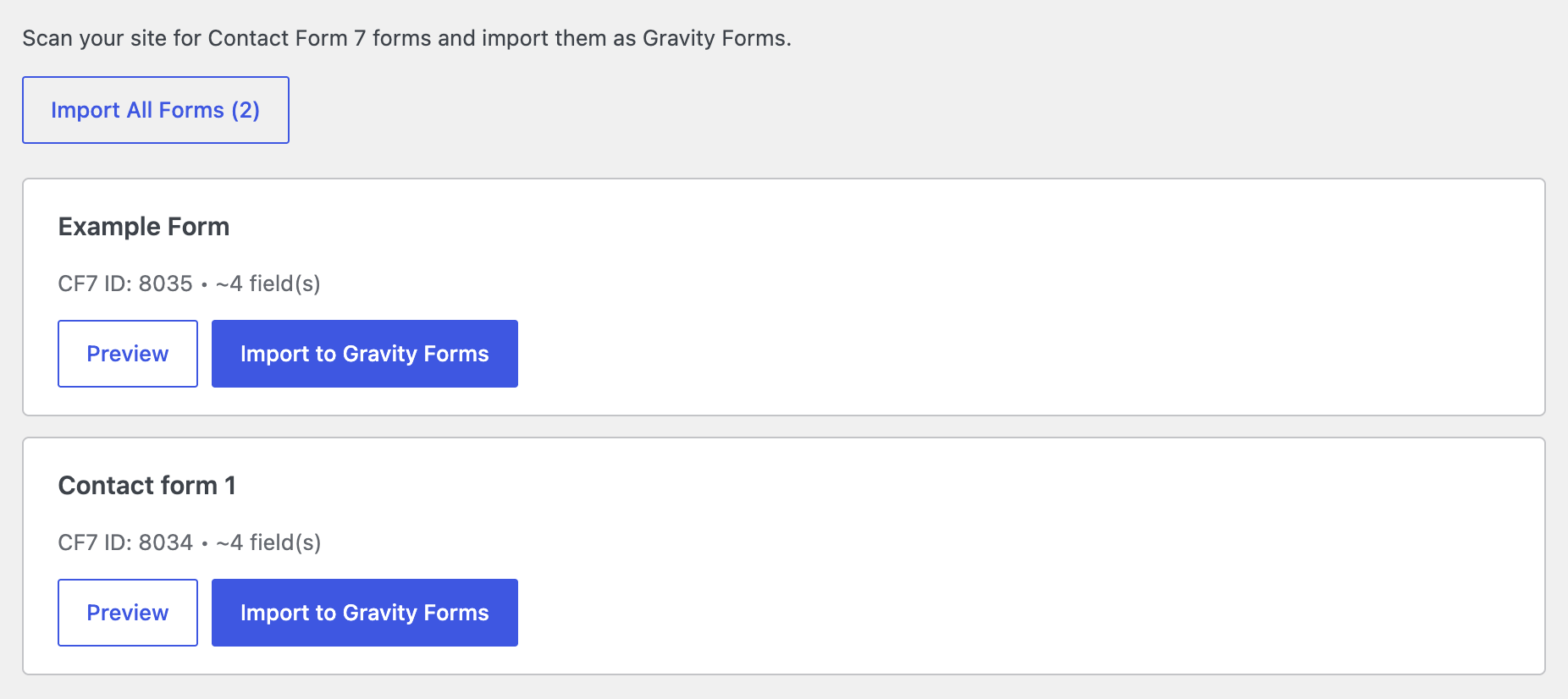
The plugin provides an import screen where you can review and migrate Contact Form 7 forms into Gravity Forms.
- Go to Forms → CF7 to GF in the WordPress admin.
- The plugin will scan for Contact Form 7 forms in your database.
- Review the list of detected forms.
- Click Preview to inspect the mapped fields, mail settings, warnings, and raw Contact Form 7 template.
- Click Import to Gravity Forms to migrate a single form.
- Or click Import All Forms to migrate all detected forms at once.
After import, the new form is created in Gravity Forms and can be edited like any other Gravity Forms form.
What Gets Imported
The plugin converts the following parts of a Contact Form 7 form into Gravity Forms when possible:
- Form title
- Form fields
- Required field settings
- Placeholder text
- Default values
- CSS classes and IDs
- File upload restrictions
- Number field min/max values
- Mail notification settings
- Success confirmation message
It also adds an imported form description noting the original Contact Form 7 form ID.
Supported Field Types
| Contact Form 7 | Gravity Forms |
|---|---|
| text / text* | Text |
| email / email* | |
| url / url* | Website |
| tel / tel* | Phone |
| textarea / textarea* | Paragraph Text |
| select / select* | Drop Down |
select with multiple | Multi Select |
| checkbox / checkbox* | Checkboxes |
| radio / radio* | Radio Buttons |
| file / file* | File Upload |
| date / date* | Date |
| number / number* | Number |
| acceptance / acceptance* | Consent |
| quiz / quiz* | Quiz or Text fallback |
| hidden | Hidden |
Preview Before Import
Before importing, you can preview:
- The fields that will be created in Gravity Forms
- Field labels and required settings
- Placeholder values
- Choice-based field options
- File upload restrictions
- Mail settings
- Raw Contact Form 7 form markup
- Any import warnings
This helps you confirm how the form will be converted before creating the Gravity Forms form.
Notifications and Confirmations
The plugin attempts to convert Contact Form 7 mail settings into a Gravity Forms admin notification, including:
- Recipient
- Subject
- Message body
- Reply-To
- From
- CC
- BCC
It also converts the Contact Form 7 success message into a default Gravity Forms confirmation message when available.
Quiz Field Behavior
If a Contact Form 7 form contains quiz fields:
- and the Gravity Forms Quiz Add-On is active, quiz fields are imported as native Gravity Forms quiz fields.
- and the Gravity Forms Quiz Add-On is not active, quiz fields are imported as plain text fields instead.
When this fallback happens, the plugin shows a warning so you know manual review may be needed.
Notes and Limitations
- Contact Form 7 conditional logic is not migrated
- Custom Contact Form 7 validation hooks are not migrated
- Complex formatting or behavior added by Contact Form 7 extensions may require manual review after import
- Imported forms will use Gravity Forms styling rather than any Contact Form 7-specific front-end styling
- Quiz fields require the Gravity Forms Quiz Add-On for full native quiz support
Troubleshooting
If a form does not import as expected:
- Confirm Gravity Forms is installed and active
- Check that Contact Form 7 forms exist in your database
- Preview the form before import to inspect warnings and mapped field details
- Review the imported form in Gravity Forms and make any manual adjustments needed
- If quiz fields were imported as text fields, install and activate the Gravity Forms Quiz Add-On and re-import if needed