

Overview
The Gravity Forms Discord Add-On helps you send Gravity Forms submissions directly to Discord channels using Incoming Webhooks. Instead of manually checking entries or building custom notification workflows, you can automatically post form submissions to Discord as rich embeds, map important field values into clean message layouts, and control delivery using native Gravity Forms feed settings.
Whether you want instant alerts for contact forms, lead notifications for sales teams, support intake posts, application routing, or internal operational updates, this add-on makes it easy to push form activity into the Discord channels your team already uses.
Key Features
- 🚀 Send Form Entries to Discord Instantly: Deliver Gravity Forms submissions to Discord channels through Incoming Webhooks.
- 🎨 Rich Embed Formatting: Post submissions as structured Discord embeds with titles, descriptions, colors, and mapped fields.
- 🧩 Flexible Field Mapping: Map Gravity Forms field values and merge tags into Discord embed fields.
- 🔀 Conditional Feed Logic: Send messages only when form data matches the conditions you define.
- ⚡ Asynchronous Processing: Process webhook deliveries in the background so form submissions are not delayed by Discord response time.
- 🔁 Automatic Retry Handling: Retry temporary delivery failures, including rate limits and server-side errors.
- ⏳ Discord Rate Limit Awareness: Respect Discord’s
Retry-Afterbehavior when webhook requests are throttled. - 📬 Feed-Based Configuration: Create and manage Discord integrations per form using the Gravity Forms Feed Add-On framework.
- 🧪 Built-In Test Sending: Send a test message before going live to confirm the webhook and message configuration are correct.
- 🔄 Manual Resend Tools: Resend failed or previously sent entries from the entry detail screen or with bulk actions.
- 📊 Delivery Status Tracking: Track whether a message was delivered, is retrying, or failed.
- 📝 Entry Note Logging: Record delivery attempts in entry notes for visibility and troubleshooting.
- 🙈 Webhook URL Masking: Protect sensitive webhook URLs in logs and admin output.
- ⚙️ Native Gravity Forms Integration: Configure everything from familiar Gravity Forms form and feed settings screens.
- 💬 Great for Team Notifications: Ideal for lead alerts, contact form notifications, support intake, registrations, applications, and internal workflow updates.
How It Works
The plugin adds Discord webhook delivery directly into the Gravity Forms feed workflow inside WordPress.
- Install and activate the add-on.
- Create an Incoming Webhook in Discord for the channel where you want messages posted.
- Open a form in Gravity Forms and go to Settings > Discord.
- Add a new Discord feed.
- Paste in the Discord webhook URL.
- Configure the embed title, description, color, and mapped fields.
- Optionally configure username/avatar overrides and conditional logic.
- Save the feed.
- Use Send Test to Discord to verify the setup.
- When a user submits the form, the add-on sends the configured entry data to Discord as a rich embed.
- If delivery is temporarily blocked by rate limits or transient errors, the add-on retries automatically.
- If needed, you can review delivery status, inspect entry notes, and resend entries manually.
Ideal Use Cases
- Sales lead notifications
- Contact form alerts
- Support request intake
- Job application notifications
- Event registration monitoring
- Internal operations alerts
- Team-based workflow routing through Discord channels
Please log in to access this content. Log in
Requirements
- WordPress 6.5+
- PHP 7.4+
- Gravity Forms 2.9.24+
- A Discord server with permission to create or manage webhooks
Changelog
0.1.0-alpha.1
Initial release.
- Feed-based delivery of Gravity Forms submissions to Discord channels via Incoming Webhooks.
- Rich embed messages: title, description, color, footer, timestamp, and mapped embed fields (inline or stacked).
- Asynchronous processing so webhook latency never blocks the submission redirect.
- View more
Documentation
Discord Add-On Documentation
The Gravity Forms Discord Add-On connects Gravity Forms to Discord using Incoming Webhook URLs. Each feed sends a form submission to a Discord channel as a rich embed, with mapped form data, conditional logic support, retry handling, delivery status tracking, resend tools, and test sending built into the add-on.
Key Features
- Send Gravity Forms submissions to Discord via Incoming Webhook
- Create one or more feeds per form using the Gravity Forms Feed Add-On framework
- Build a rich Discord embed from mapped form fields and merge tags
- Support feed conditional logic
- Process feeds asynchronously so submission redirects are not blocked by webhook delivery
- Retry transient delivery failures using WP-Cron backoff
- Honor Discord
Retry-Afterwhen rate limited with HTTP429 - Store delivery status in entry meta and show it in the entries list
- Add entry notes for delivery attempts
- Resend a single entry from the entry detail screen
- Resend entries in bulk from the entries list
- Send a test message using the latest entry or generated sample data
- Mask webhook URLs in logs using
GF_Discord::mask_url() - Use the WordPress HTTP API and return
WP_Erroron transport failures
Requirements
- WordPress 6.5+
- PHP 7.4+
- Gravity Forms 2.9.24+
- A Discord server with permission to create or manage webhooks
Installation
- Upload the
gravityformsdiscordfolder to/wp-content/plugins/, or install the plugin zip from the WordPress Plugins screen. - Activate Gravity Forms Discord Add-On.
- Ensure Gravity Forms is installed and active.
- In Discord, create an Incoming Webhook for the channel where messages should be posted.
- In WordPress, open your form and go to Settings → Discord.
- Create a new feed and paste the webhook URL.
- Configure the embed content and mapped fields.
- Save the feed and use Send Test to Discord before enabling it in production.
Using the Add-On
Typical workflow:
- Activate the plugin
- Open a Gravity Forms form
- Go to Settings → Discord
- Add a new Discord feed
- Paste the Discord webhook URL
- Set the embed title and description
- Map embed fields from form fields or custom merge-tag values
- Optionally configure username/avatar overrides and layout options
- Optionally apply conditional logic
- Save the feed
- Use Send Test to Discord
- Submit a real entry and monitor delivery status from the entries screen
Feed Settings
Location:
Form Settings → Discord
Available settings include:
Feed Name
An internal label used to identify the feed in the admin UI.
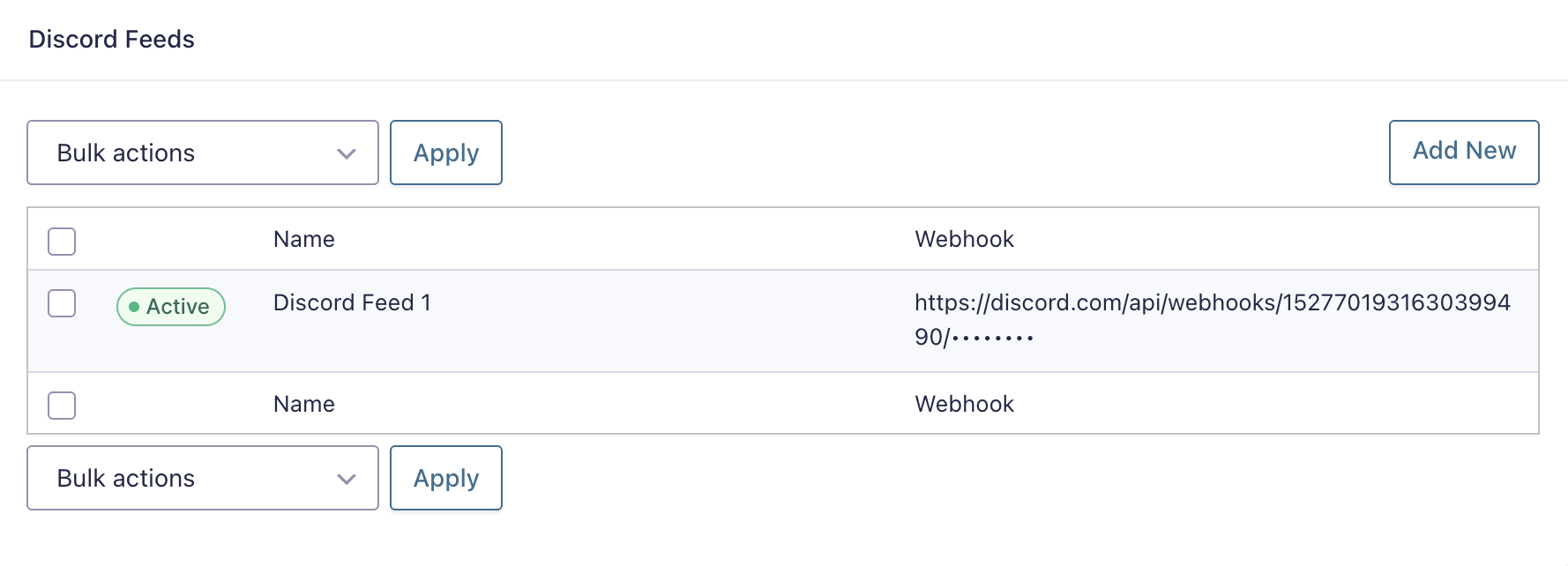
Webhook URL
The Discord Incoming Webhook URL used for delivery.
This is the only authentication mechanism used by the add-on. No bot token, app registration, or OAuth connection is required.

Embed Title
The embed title shown in Discord.
- Supports Gravity Forms merge tags
- Subject to Discord embed title length limits
Embed Description
The main body text of the embed.
- Supports Gravity Forms merge tags
- Subject to Discord embed description length limits
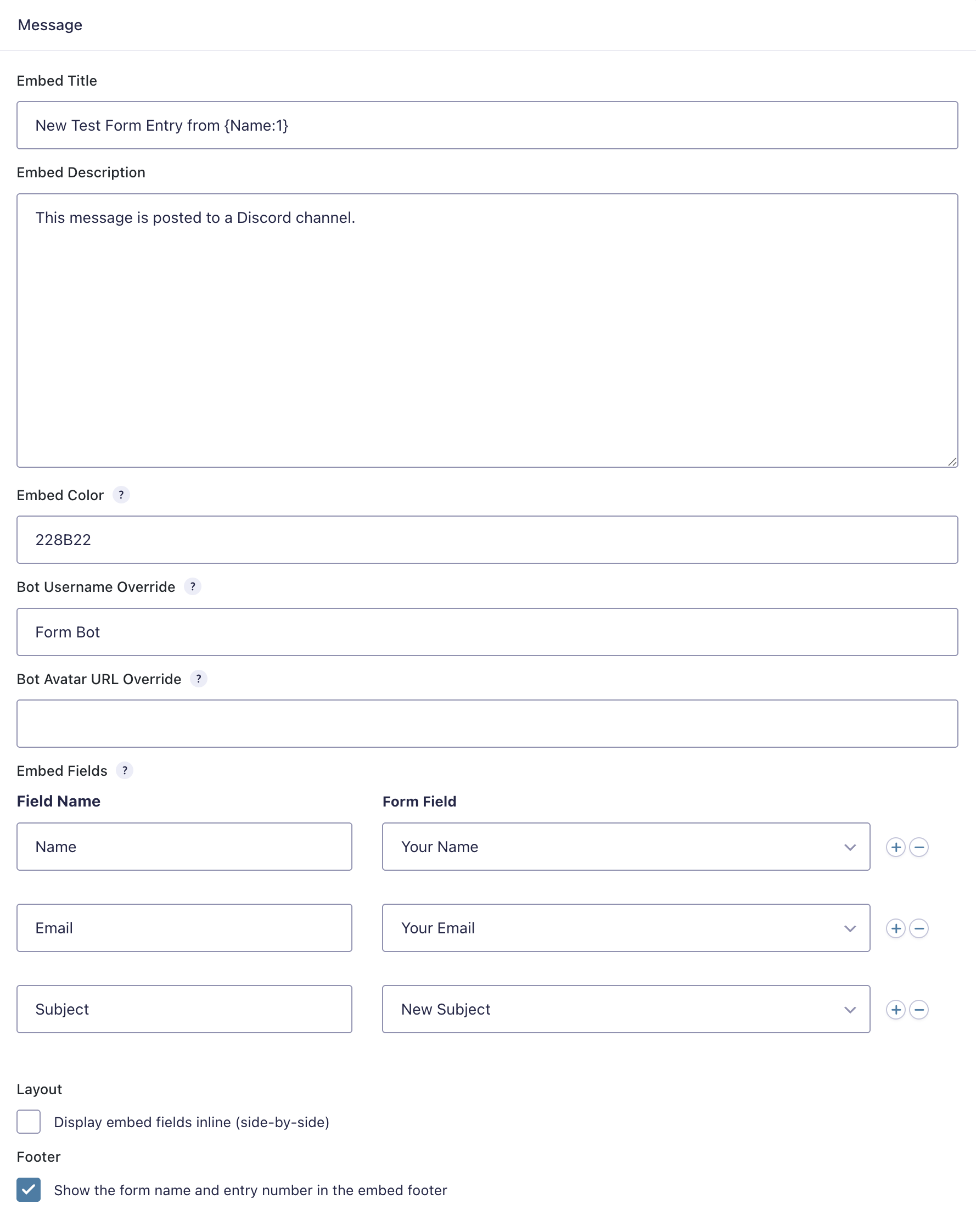
Embed Fields
Mapped rows that define the fields displayed in the Discord embed.
Each row typically contains:
- field label/name
- mapped Gravity Forms field or custom merge-tag value
- inline display behavior, where applicable
The add-on limits fields to Discord’s embed constraints.
Embed Color
The embed accent color.
If left empty, the feed can fall back to the add-on’s default/global color when configured.
Display Embed Fields Inline
Controls whether mapped embed fields render side-by-side in Discord instead of stacked vertically.
Bot Username Override
Optionally override the webhook’s default display name for this feed.
Avatar URL Override
Optionally override the webhook’s default avatar image for this feed.
Conditional Logic
Use standard Gravity Forms feed conditional logic to determine whether the Discord message should be sent for a given submission.
Message Format
Each feed posts a Discord webhook payload containing a single embed.
Typical payload shape:
{
  "embeds": [
    {
      "title": "New submission",
      "description": "A new form entry was received.",
      "color": 5793266,
      "fields": [
        { "name": "Name", "value": "Jane Doe", "inline": true },
        { "name": "Email", "value": "[email protected]", "inline": true }
      ]
    }
  ]
}
Code language: JSON / JSON with Comments (json)
The add-on can also include:
usernameavatar_url
These are added only when overrides are configured on the feed.
Reliability and Delivery Behavior
The add-on is built to support reliable webhook delivery and recovery behavior.
Async Processing
Feeds are processed asynchronously so Discord latency does not delay the front-end submission flow.
Retry Handling
Transient failures are retried through WP-Cron with backoff.
Behavior includes:
200/204: delivery succeeded429: retry after Discord’sRetry-After404: stop retrying because the webhook is no longer valid- other
4xx: permanent failure 5xxand transport errors: retry with backoff
Delivery Status
Each entry stores delivery status meta, and the entries list can show a Discord Delivery indicator.
Statuses include:
- delivered
- retrying
- failed
Entry Notes
Delivery attempts are recorded as entry notes for troubleshooting and audit visibility.
Resend Tools
The add-on supports:
- single resend from the entry detail sidebar
- bulk resend from the entries list
Send Test
A Send Test action can post a sample Discord message using either:
- the most recent real entry
- generated sample data when needed
Discord Limits and Formatting Notes
The delivery class accounts for Discord embed limits, including limits for:
- title
- description
- field name
- field value
- total field count
If configured content exceeds Discord limits, it should be trimmed or constrained to valid embed sizes before sending.
Logging and Security
- Webhook URLs should not be exposed in plain text in logs or notes
- The add-on includes URL masking for webhook logging
- Transport failures use
WP_Error - Outbound requests use the WordPress HTTP API