

Overview
The Gravity Forms Entry Assets Add-On helps you download files, entry notes, and Gravity Flow timelines from multiple entries at once. Instead of opening each entry individually, you can select the entries you need and prepare a ZIP, HTML, or CSV download directly from the familiar Gravity Forms Entries list or Gravity Flow Status page.
Whether you need to collect résumés from job applications, download project documents, archive entry notes, export workflow histories, or gather every file matching a filtered search, this add-on makes it easier to manage entry assets outside WordPress.
Key Features
📦 Bulk File Downloads: Download uploaded files from multiple Gravity Forms entries in a single ZIP archive.
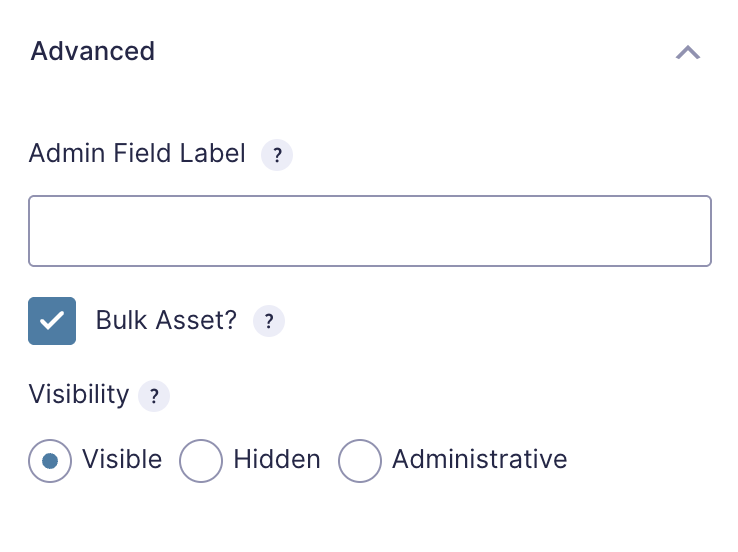
✅ Opt-In File Fields: Enable Bulk Asset? on individual File Upload fields to control exactly which uploads can be included.
🎯 Field-Specific Downloads: Download files from one enabled upload field or collect files from all enabled fields at once.
📝 Entry Note Exports: Export Gravity Forms entry notes as readable HTML or structured CSV files.
🔁 Gravity Flow Integration: Download entry files and export workflow timelines from the Gravity Flow Status page.
📋 Timeline Exports: Export Gravity Flow timeline notes as HTML or CSV for reviews, audits, handoffs, and offline records.
🔍 Select All Matching Entries: Process every entry matching the current Gravity Forms search or filter—not just the entries visible on the current page.
⏳ Chunked Background Processing: Prepare larger downloads in manageable chunks to avoid relying on one long-running request.
📊 Live Progress Tracking: Follow the number of processed entries while the add-on prepares the download.
❌ Cancellation Controls: Cancel an active download job from the progress dialog when it is no longer needed.
🗂️ Organized ZIP Archives: Group uploaded files into folders by entry ID to keep assets from different submissions organized.
⚙️ Customizable Folder and File Names: Use WordPress filters and Gravity Forms merge tags to customize archive folders and filenames.
📄 Flexible Export Packaging: Combine notes or timelines into one file or create a ZIP containing a separate export for each entry.
🔌 Custom File Path Support: Resolve files stored in custom upload locations with a developer filter.
🧹 Automatic Cleanup: Remove expired jobs and temporary archives automatically.
🔐 Capability-Based Access: Restrict downloads to users with the appropriate Gravity Forms and Gravity Flow permissions.
🛡️ Authenticated Downloads: Deliver completed archives through authenticated WordPress AJAX requests instead of exposing direct public download URLs.
⚡ No Separate Settings Screen: Configure file availability directly on File Upload fields and use native bulk-action menus for downloads.
How It Works
The plugin adds entry asset downloads directly to the existing Gravity Forms and Gravity Flow bulk-action workflows inside WordPress.
- Install and activate the add-on.
- Open a form in the Gravity Forms form editor.
- Select a File Upload field.
- Open the field’s Advanced tab.
- Enable Bulk Asset? for each upload field you want to include in bulk file downloads.
- Save the form.
- Go to Forms > Entries.
- Select individual entries or choose all entries matching the current search or filter.
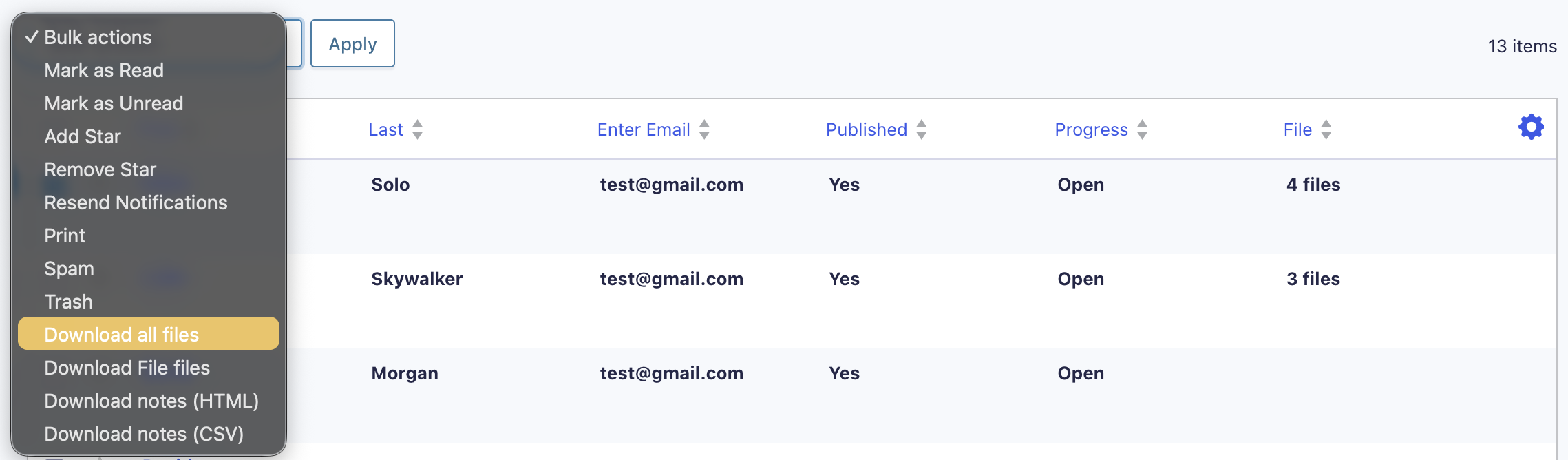
- Choose an available bulk action to download all enabled files, files from a specific field, or entry notes as HTML or CSV.
- Keep the progress dialog open while the add-on prepares the download.
- Download the completed export when it is ready.
- If Gravity Flow is active, open its Status page to download files or export timeline notes for selected workflow entries.
- If needed, use developer filters to customize archive organization, filenames, file-path resolution, or notes and timeline packaging.
Temporary job files are automatically removed after they expire. Deactivating or deleting the add-on also cleans up its temporary download data.
Please log in to access this content. Log in
Requirements
- WordPress 6.5 or newer
- PHP 7.4 or newer
- Gravity Forms 2.9.24 or newer
- PHP ZipArchive extension for file downloads and per-entry archives
- Gravity Flow, optionally, for Status page and timeline features
Changelog
0.1.0-alpha.1
2026-08-24
- Initial Labs release.
- Bulk download of entry file uploads as a ZIP from the Gravity Forms Entries list and the Gravity Flow Status page.
- Opt-in “Bulk Asset?” setting on File Upload fields, so only chosen fields are included in ZIP downloads.
- View more
Documentation
Entry Assets Add-On Documentation
Bulk-download files, entry notes, and Gravity Flow timelines from Gravity Forms entries without opening each entry individually.
Features
- Download selected entry file uploads as a ZIP archive.
- Export Gravity Forms entry notes as HTML or CSV.
- Export Gravity Flow timeline notes as HTML or CSV.
- Run downloads from the Gravity Forms Entries list or Gravity Flow Status page.
- Process all entries matching the current Entries search or filter.
- Process large selections in chunks with progress and cancellation controls.
- Customize archive folders and filenames with Gravity Forms merge tags and WordPress filters.
- Automatically clean up expired download jobs and temporary archives.
Requirements
- WordPress 6.5 or newer
- PHP 7.4 or newer
- Gravity Forms 2.9.24 or newer
- PHP
ZipArchiveextension for file downloads and per-entry archives - Gravity Flow, optionally, for Status page and timeline features
If ZipArchive is unavailable, the Bulk Asset? field setting and ZIP download actions are disabled. Consolidated HTML and CSV exports remain available.
Installation
- Download or clone this repository.
- Place it in the following WordPress plugins directory:
wp-content/plugins/gravityformsentryassets/- Confirm that Gravity Forms is installed and active.
- Activate Gravity Forms Entry Assets Add-On from the WordPress Plugins screen.
The add-on does not have a separate settings page.
Usage
Download uploaded files
File Upload fields must be enabled individually before their files are included in bulk downloads.
- Open a form in the Gravity Forms form editor.
- Select a File Upload field.
- Open the field’s Advanced tab.
- Enable Bulk Asset?
- Save the form.
- Go to Forms → Entries.
- Select the entries to process.
- Choose one of the available actions:
- Download all files
- Download field name files
- Apply the bulk action.
- Keep the progress dialog open until the download is ready.
Files are grouped into folders by entry ID inside the ZIP by default:
42/resume.pdf
42/portfolio.pdf
43/resume.pdf
Only File Upload fields with Bulk Asset? enabled are included.
Export Gravity Forms entry notes
- Go to Forms → Entries.
- Select the entries to export.
- Choose one of the following bulk actions:
- Download notes (HTML)
- Download notes (CSV)
- Apply the action.
- Keep the progress dialog open until the export is ready.
By default, the selected entries are combined into one HTML or CSV file.
Export Gravity Flow timelines
Gravity Flow must be installed and active to use timeline exports.
- Open the Gravity Flow Status page.
- Filter the Status page to a single form.
- Select the entries to export.
- Choose one of the following bulk actions:
- Download timeline (HTML)
- Download timeline (CSV)
- Apply the action.
- Keep the progress dialog open until the export is ready.
Download all matching entries
On the Gravity Forms Entries page, the add-on supports processing all entries that match the current search or filter—not only the entries displayed on the current page.
The active entry status, search field, search value, and comparison operator are used to determine which entries are included.
Logging
Logging is integrated with the Gravity Forms logging system.
To enable it:
- Go to Forms → Settings → Logging.
- Locate Entry Assets.
- Enable logging.
- Reproduce the issue.
- Review the generated log.
Do not share logs publicly without reviewing them for entry data, filenames, paths, or other sensitive information.
Troubleshooting
File download actions are missing
Confirm that:
- Gravity Forms 2.9.24 or newer is active.
- The current user has
gravityforms_export_entries. - Bulk Asset? is enabled on at least one File Upload field.
- The form has been saved after enabling the field setting.
- PHP
ZipArchiveis installed.
The Bulk Asset setting is missing
The setting is only available when:
- The selected field is a File Upload field.
- PHP
ZipArchiveis available. - The add-on’s form editor script is loaded.
Check the Gravity Forms system report for the PHP ZipArchive status.
Gravity Flow actions are missing
Confirm that:
- Gravity Flow is installed and active.
- The current user has
gravityflow_status. - The Status page is filtered to a single form.
- The selected form contains a File Upload field with Bulk Asset? enabled when downloading files.
A download contains no files
Confirm that:
- The selected entries contain files in the enabled fields.
- The source files still exist.
- The files are readable by PHP.
- Custom storage paths are resolved through
gform_entry_assets_file_path. - The resolved files remain inside the WordPress uploads directory.
A large download does not finish
- Keep the progress dialog open.
- Confirm that authenticated AJAX requests are not being blocked.
- Check PHP and web-server logs for timeout or filesystem errors.
- Check the Entry Assets Gravity Forms log.
- Confirm that the WordPress uploads directory is writable.
- Try a smaller selection to determine whether the issue is entry-specific.
ZIP downloads are unavailable
Ask the hosting provider to enable the PHP ZipArchive extension.
Without ZipArchive:
- File ZIP downloads are disabled.
- The Bulk Asset? field setting is hidden.
- Per-entry notes and timeline archives are unavailable.
- Consolidated notes and timeline HTML or CSV exports remain available.