

Overview
The Gravity Forms Overflow Add-On helps you keep collecting submissions after a form reaches capacity or passes its scheduled end date. Instead of closing the form and losing interested users, Overflow routes additional submissions into a separate Overflow List so you can follow up, build demand, or manage a waitlist.
Designed for registrations, events, classes, giveaways, campaigns, and other capacity-limited forms, Overflow extends Gravity Forms’ native Entry Limit and Schedule Form settings without requiring a separate feed, external service, or custom workflow.
Key Features
- 🧾 Capture Overflow Submissions: Keep accepting entries after a form reaches its entry limit or schedule end.
- 🚦 Use Native Gravity Forms Restrictions: Builds on the existing Entry Limit and Schedule Form settings.
- 📋 Separate Overflow List: Route additional submissions into a dedicated Overflow List instead of rejecting them.
- ✅ Confirmed vs. Overflow Views: Easily distinguish confirmed entries from overflow entries in the Gravity Forms entries list.
- 💬 Custom Overflow Confirmation Message: Show a tailored message to users who are added to the Overflow List.
- 🔢 Optional Queue Positions: Turn overflow submissions into an ordered waitlist with position tracking.
- 🏷️ Waitlist Merge Tags: Use
{overflow_position}and{overflow_people_ahead}in confirmation messages. - 🔁 Auto-Promotion Support: Automatically promote the next overflow entry when a confirmed slot opens.
- 👆 Manual Promotion Tools: Move a single overflow entry to Confirmed from the entries list.
- 📦 Bulk Promotion: Promote multiple overflow entries at once while respecting capacity rules.
- 📤 Filter and Export Friendly: Overflow entry meta makes it easy to filter, display, and export overflow submissions.
- 🧩 Native Gravity Forms Integration: Configure everything from the familiar form settings and entries screens.
- 🧪 Ideal for Capacity-Limited Forms: Useful for sold-out events, class registrations, giveaways, application rounds, and post-deadline lead capture.
How It Works
Overflow adds waitlist-style behavior directly to Gravity Forms’ built-in restriction system.
- Install and activate the Overflow Add-On.
- Open the form you want to manage.
- Go to Form Settings → Restrictions.
- Enable Entry Limit, Schedule Form, or both.
- Under Overflow List, enable overflow handling for the form.
- Choose when the Overflow List should activate:
- when the entry limit is reached
- when the schedule end date/time passes
- Customize the confirmation message shown to overflow submissions.
- Optionally enable queue position tracking.
- Optionally enable auto-promotion when a confirmed slot becomes available.
- Save the form settings.
When the form reaches capacity or passes its scheduled end date, Gravity Forms stays open. New submissions are accepted and tagged as overflow entries instead of being rejected.
Admins can view entries using the Confirmed and Overflow List filters, manually promote overflow entries, or let Overflow automatically promote the next eligible entry when a confirmed spot opens.
Built For
- Event and ticket registrations
- Classes, cohorts, and workshops
- Giveaways and contests
- Limited-capacity applications
- Scheduled campaigns
- Sold-out offers
- Backup lists and lead capture after capacity is reached
Why Use Overflow
Without Overflow, Gravity Forms’ native Entry Limit and Schedule Form restrictions simply close the form once the limit or deadline is reached. That means interested users cannot submit, and site owners lose valuable demand signals.
Overflow keeps the form available, captures those additional submissions, and gives administrators a simple way to manage follow-up, waitlists, and promotion from inside Gravity Forms.
Please log in to access this content. Log in
Requirements
- WordPress 6.5+
- PHP 7.4+
- Gravity Forms 2.9.24+
Changelog
0.1.0-alpha.1
2026-08-04
- Initial Labs release.
- Keep forms open past Entry Limit and/or Schedule Form end, routing further submissions into an Overflow List.
- Optional ordered queue-position tracking with
{overflow_position}and{overflow_people_ahead}merge tags. - View more
Documentation
Overflow Add-On Documentation
The Gravity Forms Overflow Add-On keeps Gravity Forms open after a form reaches its Entry Limit or Schedule Form end date. Instead of closing the form and rejecting further submissions, it captures those submissions into a separate Overflow List.
Key Features
- Keep forms open after the Entry Limit is reached
- Keep forms open after the Schedule Form end date/time passes
- Route additional submissions into a separate Overflow List
- Show a custom confirmation message for overflow submissions
- Optionally track ordered queue positions for overflow entries
- Provide
{overflow_position}and{overflow_people_ahead}merge tags - Optionally auto-promote the next overflow entry when a confirmed slot frees up
- Manually move a single overflow entry to Confirmed
- Promote overflow entries in bulk from the entries list
- Add Confirmed and Overflow List filters to the Gravity Forms entries list
- Register overflow entry meta for filtering, display, and export
- Clean up plugin options and overflow entry meta on uninstall
Requirements
- WordPress 6.5+
- PHP 7.4+
- Gravity Forms 2.9.24+
Installation
- Download the Overflow add-on zip from the Gravity Labs site.
- In WordPress, go to Plugins → Add New → Upload Plugin.
- Upload and activate the plugin.
- Ensure Gravity Forms is installed and active.
Using the Add-On
Typical workflow:
- Activate the plugin.
- Open a Gravity Forms form.
- Go to Settings → Restrictions.
- Enable Entry Limit and/or Schedule Form.
- Under Overflow List, enable the overflow list for the form.
- Choose when the overflow list should activate:
- When the entry limit is reached
- When the Schedule Form end date/time passes
- Configure the overflow confirmation message.
- Optionally enable queue position tracking.
- Optionally enable auto-promotion.
- Save the form settings.
- Review confirmed and overflow entries from the form’s Entries list.
Form Settings
Location:
Form Settings → Restrictions → Overflow List
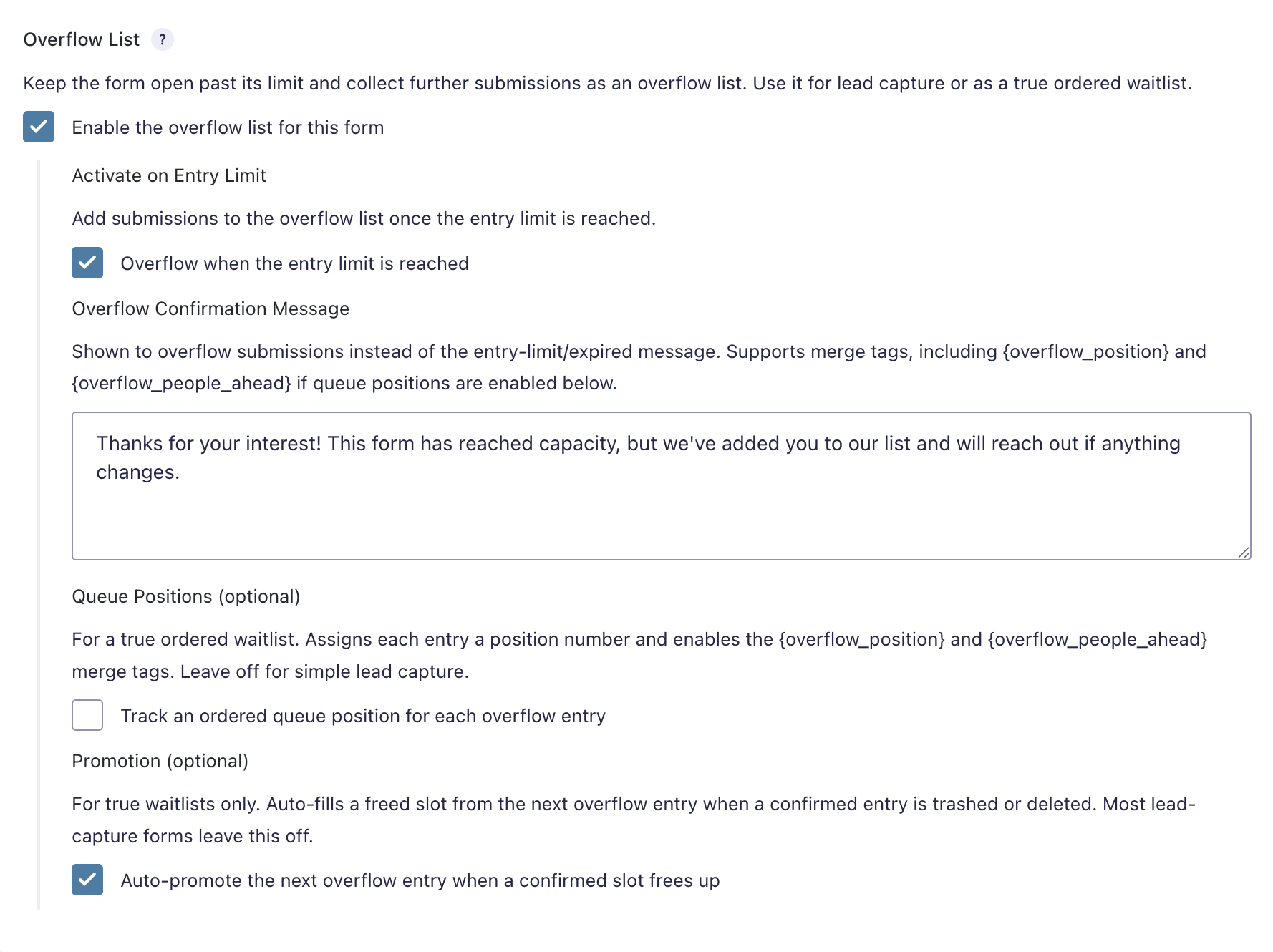
Enable the Overflow List
Turns on overflow handling for the form.
Overflow is only available when the form has at least one supported restriction enabled:
- Entry Limit
- Schedule Form
Activate on Entry Limit
Routes submissions to the Overflow List once the form’s configured entry limit has been reached.
This option is available only when Gravity Forms’ native Entry Limit setting is enabled.
Activate on Schedule End
Routes submissions to the Overflow List once the form’s Schedule Form end date/time has passed.
This option is available only when Gravity Forms’ native Schedule Form setting is enabled.
If both triggers are enabled, overflow activates when either configured condition is met.
Overflow Confirmation Message
The confirmation message shown to overflow submissions instead of the normal form confirmation or closed-form message.
Supports Gravity Forms merge tags, including the Overflow merge tags when queue position tracking is enabled.
Default message:
Thanks for your interest! This form has reached capacity, but we’ve added you to our list and will reach out if anything changes.
Queue Positions
Optional.
When enabled, each overflow entry receives a 1-based queue position. This allows the Overflow List to behave as a true ordered waitlist.
Enables these merge tags:
{overflow_position}{overflow_people_ahead}
If queue positions are disabled, the add-on can still collect overflow submissions as a simple lead-capture list.
Promotion
Optional.
When enabled, Overflow can automatically promote the next overflow entry to Confirmed when a confirmed entry is trashed or deleted.
This is intended for true waitlist use cases where freed capacity should be filled from the overflow queue.
Entry Classification
Overflow stores entry meta to distinguish confirmed submissions from overflow submissions.
Entry Meta
overflow_lead0= confirmed entry1= overflow entry
overflow_position- Stores the queue position when queue tracking is enabled
These meta values allow entries to be filtered, displayed, and exported.
Admin Experience
The add-on extends the Gravity Forms entries list with additional tools.
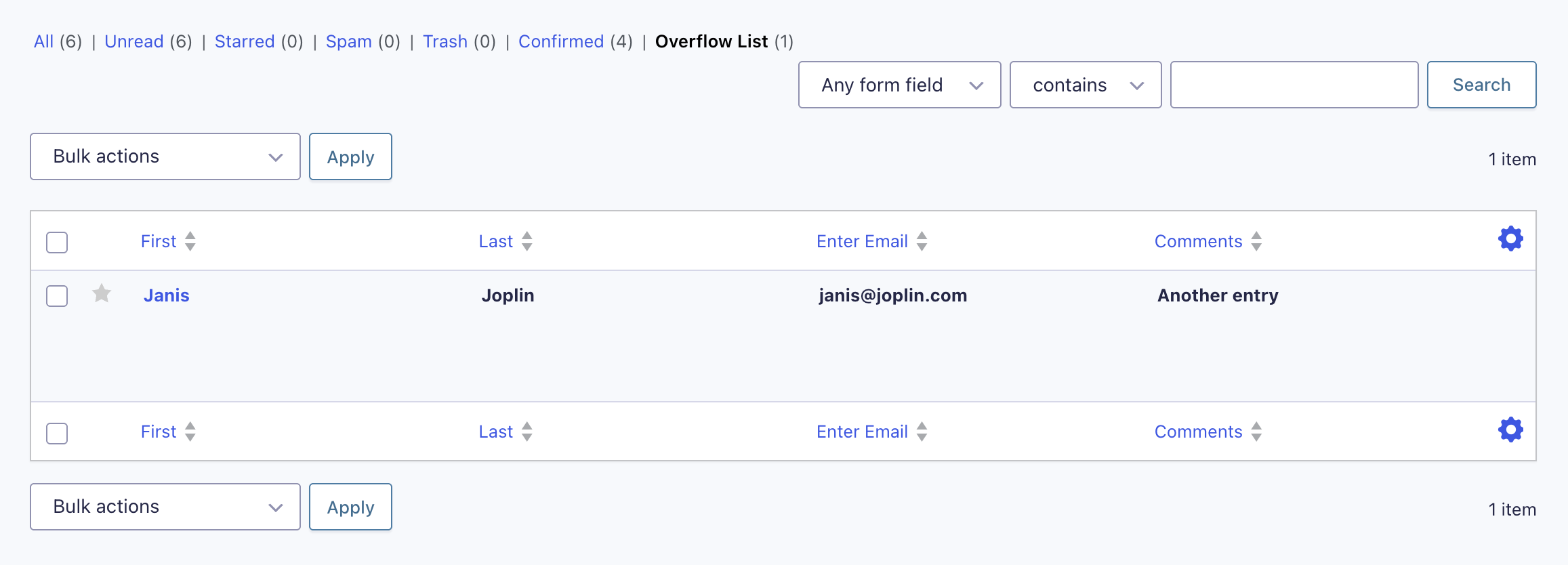
Entry Filters
Overflow-enabled forms include separate entry list filters for:
- Confirmed
- Overflow List
Manual Promotion
Admins with entry-editing permissions can move an individual overflow entry to Confirmed using the Move to Confirmed row action.
For entry-limit-based overflow, manual promotion respects the configured entry limit and will not silently exceed the confirmed capacity.
Bulk Promotion
Admins can select multiple overflow entries and use the Promote to Confirmed bulk action.
Selected entries are promoted in queue order when position tracking is enabled. Otherwise, they are promoted oldest-first.
Entry Notes
When an overflow entry is promoted, the add-on adds an entry note indicating that the entry was promoted from the overflow list to confirmed.
Merge Tags
{overflow_position}
Outputs the overflow entry’s queue position.
Only populated when queue position tracking is enabled.
{overflow_people_ahead}
Outputs the number of overflow entries ahead of the current entry.
Only populated when queue position tracking is enabled.
Hooks
gform_overflow_entry_promoted
Fires after an overflow entry is promoted to confirmed.
do_action( ‘gform_overflow_entry_promoted’, $entry_id, $form );
Parameters:
$entry_id— The promoted entry ID$form— The Gravity Forms form object
Behavior Notes
Keeping Forms Open
Overflow disables the relevant native restriction at runtime so the form remains available for submission after the configured trigger is met.
- Entry Limit is disabled at runtime when the entry-limit overflow trigger is active.
- Schedule Form is disabled at runtime only after the configured schedule end date/time has passed.
Confirmed vs. Overflow Entries
When a new entry is saved, Overflow determines whether it should remain confirmed or be tagged as overflow.
An entry becomes overflow when:
- The schedule-end trigger is active and the schedule end date/time has passed, or
- The entry-limit trigger is active and the confirmed entry count has reached the configured limit
Auto-Promotion
When auto-promotion is enabled, the add-on reconciles the waitlist when a confirmed entry is trashed or deleted.
The next overflow entry is selected by:
- Queue position, if position tracking is enabled
- Oldest entry first, if position tracking is disabled
Queue Renumbering
When queue position tracking is enabled, remaining overflow entries are renumbered after promotion or reconciliation.
The add-on renumbers up to 500 overflow entries in a single pass.
Known Limitations
- Raising a form’s entry limit after entries have already been collected does not automatically promote existing overflow entries into the newly available capacity.
- Recurring entry limits continue accumulating overflow entries; the Overflow List does not reset alongside the recurring limit period.
- Queue positions and auto-promotion are optional and independent.
- Near-capacity concurrent submissions may slightly over-confirm under heavy load because classification depends on count-then-tag behavior.
- Queue renumbering is limited to a batch of 500 overflow entries per pass.