

Overview
Built as a first-party Gravity Forms add-on, it’s designed to help you present the right form at the right time without rebuilding pages or relying on brittle embeds. Configure everything from your Gravity Forms admin, then let the frontend behavior run automatically.
Key Features
- 🎯 Flexible Triggers: Launch popups on button click (CSS selector), timeout, scroll depth, exit intent, URL hash—or trigger programmatically via a JavaScript API.
- 🪟 Multiple Display Modes: Choose from popup, slide-in, banner, or fullscreen overlays with configurable sizing, positioning, animations, and backdrop options.
- 🧠 Targeting Rules: Control where popups can appear using targeting conditions, so you can tailor forms to specific pages and visitor contexts.
- 🍪 Dismissal & Behavior Controls: Respect “dismissed” cookies, customize cookie duration/name, optionally auto-close after submission, and configure close behaviors (ESC, backdrop click, close button).
- 🎨 Template + Styling Control: Customize the iframe template output and CSS, with support for theme template overrides for advanced implementations.
- ⚡ JavaScript API Included: Trigger popups on demand with
window.GFPopups.show(feedId)for custom flows, campaigns, or app-like interactions.
How It Works
- Install and activate Gravity Forms Popups.
- In WordPress admin, go to Forms → Popups.
- Create a popup feed and choose the Form to Display.
- Configure your Trigger, Display, Behavior, and Targeting options.
- Publish your trigger (e.g., add a button with the configured CSS selector) or use the JavaScript API to open the popup programmatically.
Please log in to access this content. Log in
Requirements
- WordPress 6.0+ (plugin header)
- PHP 8.0+ (plugin header)
- Gravity Forms 2.8+ (minimum requirement in add-on class)
Changelog
0.1.1-alpha.2
2026-08-11
- Fixed popup close click falling through to Button Click triggers when Respect Dismissal is disabled, which made the modal appear unclosable.
- Only set the dismissal cookie when Respect Dismissal is enabled.
0.1.1-alpha.1
2026-06-16
1.0.0-beta.2
2026-05-23
- Fixes Code style and static analysis issues.
- Security enhancements.
Documentation
Popups Documentation
Display Gravity Forms in popups, slide-ins, banners, and fullscreen overlays.
Key Features
- Display Gravity Forms in popups, slide-ins, banners, and fullscreen overlays (configurable display modes)
- Multiple trigger types:
- Button click (CSS selector)
- Exit intent
- Timeout (delay in seconds or milliseconds)
- Scroll depth (percent or pixels)
- URL hash
- JavaScript API (
window.GFPopups.show(feedId)) - Targeting rules (configured in the Popups feed settings UI)
- Dismissal + behavior controls:
- close on backdrop click / ESC
- show/hide close button
- optional auto-close after form submission
- cookie-based dismissal (“don’t show again”) controls
- Theme template override support for popup iframe rendering (via
gravityformspopups/templates in your theme) - Custom iframe template processing supports:
{form}placeholder- Gravity Forms merge tags
- conditional template shortcodes:
[hide_if_submitted]...[/hide_if_submitted]and[show_if_submitted]...[/show_if_submitted]
Requirements
- WordPress 6.0+ (plugin header)
- PHP 8.0+ (plugin header)
- Gravity Forms 2.8+ (minimum requirement in add-on class)
Installation
- Upload the
gravityformspopupsplugin folder to/wp-content/plugins/(or install via Plugins → Add New → Upload Plugin). - Activate Gravity Forms Popups from the WordPress Plugins screen.
- In WordPress, go to Forms → Popups and:
- Create a popup feed
- Select the Form to Display
- Configure Trigger, Display, Behavior, and Targeting options
- Add the trigger to your site depending on the trigger type you chose:
- For Button Click triggers, ensure the element(s) exist on the page and match the configured CSS selector
- For URL Hash, visit a URL that includes the configured hash (e.g.
https://example.com/page/#myhash) - For JavaScript API, call
window.GFPopups.show(feedId)(see below)
Setup: Configuring the Popup
This add-on is configured through a Popups feed in Forms → Popups. Each feed represents one popup configuration.
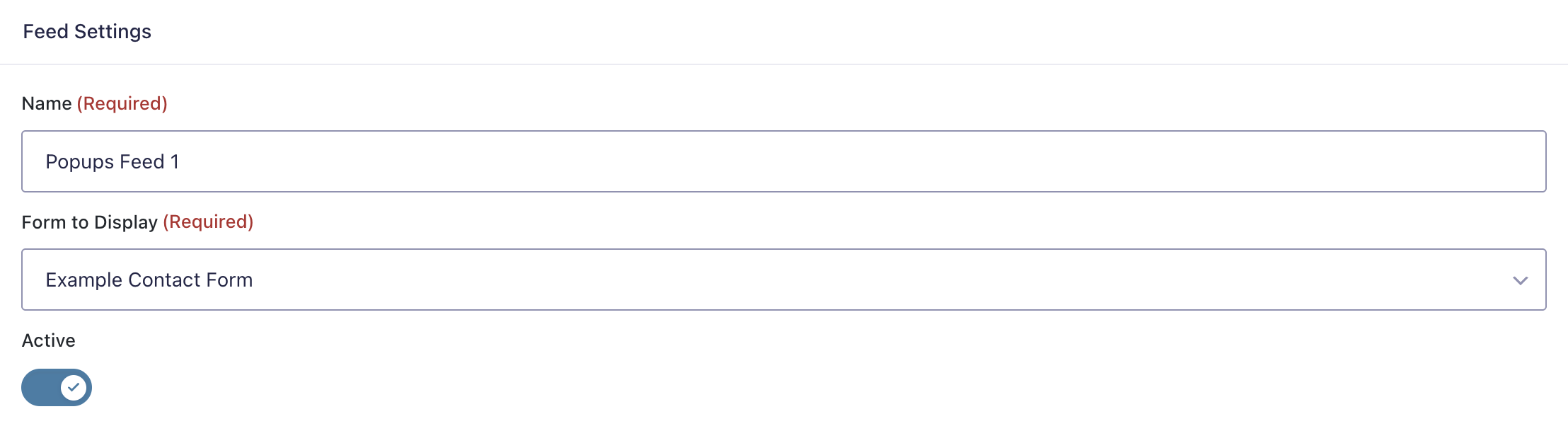
Typical items you’ll configure include:
- Form to Display (which Gravity Form renders in the popup iframe)
- Trigger (button selector, exit intent, timeout, scroll depth, URL hash, or JavaScript API)
- Display (mode, size, animation, backdrop, z-index, and close controls)
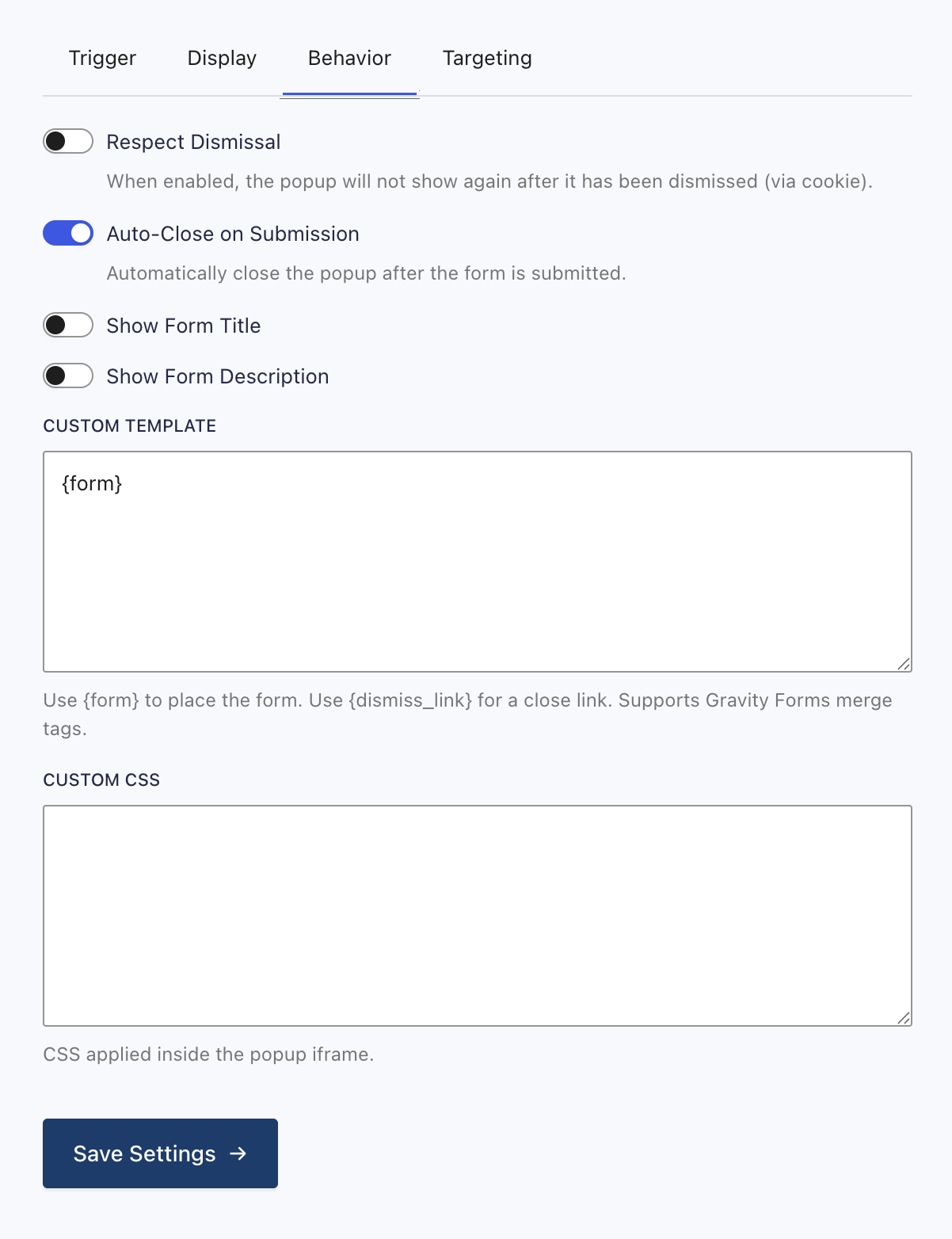
- Behavior (dismissal cookie name/duration, respect dismissal, auto-close on submission, preload iframe)
- Targeting (rules that determine where/when the popup is eligible to show)
Using the Add-On: Triggering a Popup
Depending on your selected trigger type:
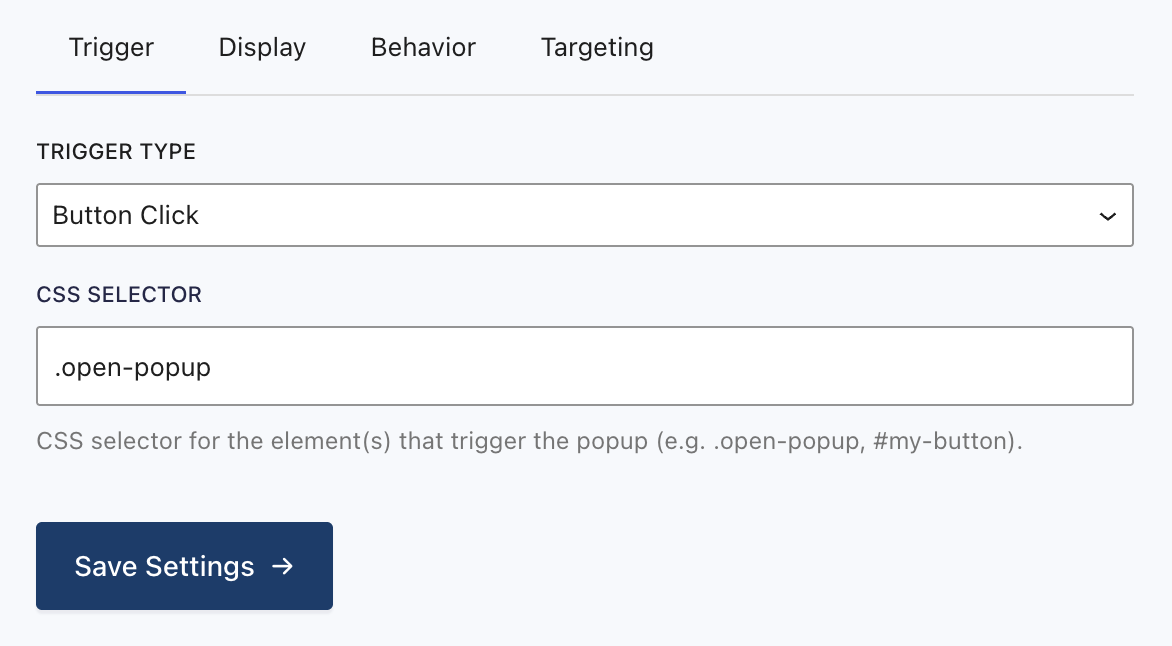
- Button Click
- Configure a CSS selector in the feed (e.g.
.open-popup,#signup-button) - Add that class/id to an element on the page
- JavaScript API
- Call the API after the page loads (example below)
- Timeout / Exit Intent / Scroll Depth / URL Hash
- Configure the trigger settings in the feed; the popup will display automatically when the trigger condition is met
Logging & Troubleshooting
If your popup isn’t behaving as expected:
- Confirm requirements
- WP 6.0+, PHP 8.0+, Gravity Forms 2.8+
- Confirm the feed is enabled
- Ensure the popup feed is marked Active
- Button-click triggers
- Verify the configured CSS selector matches an element on the page where you expect the popup to open
- Confirm the element exists at the time the popup script runs (e.g., not injected later without re-binding)
- Dismissal cookies
- If “respect dismissal” is enabled, a previously dismissed popup may not re-open until the cookie expires
- For testing, clear site cookies or change the cookie name in the feed
- Iframe / form rendering
- If the form renders but sizing is wrong, confirm the iframe can postMessage back to the parent page (same-site origin expectations apply)
- Caching
- Cookie-based dismissal is “only reliable on non-cached pages”; if you use aggressive page caching, test on an uncached page/session
- Theme template overrides
- If you override templates, verify the override file path is correct:
{theme}/gravityformspopups/iframe-form.php
JavaScript API (Trigger Type: “JavaScript API”)
When at least one popup is configured for JavaScript triggering, the frontend initializes:
window.GFPopups.show(feedId)window.GFPopups.hide(feedId)window.GFPopups.getPopup(feedId)
Example:
document.addEventListener('DOMContentLoaded', () => {
  if (window.GFPopups) {
    window.GFPopups.show(123); // 123 = popup feed ID
  }
});
Template / PHP Helpers
Useful helper functions include:
gf_popups_trigger_js($feed_id)→ returns a JS snippet likewindow.GFPopups.show(<feed_id>);gf_popups_trigger_script($feed_id)→ echoes a<script>tag to trigger on page loadgf_popups_get_iframe_url($feed_id, $args = [])→ iframe URL for a feedgf_popups_is_dismissed($feed_id)→ checks whether the dismissal cookie exists
Custom Template Conditionals
When using a custom iframe template string, you can conditionally show/hide content depending on whether the current form has been submitted:
[hide_if_submitted]...[/hide_if_submitted][show_if_submitted]...[/show_if_submitted]