

Overview
The Gravity Forms QuickEmailVerification Add-On helps you improve email quality at the point of submission by validating Gravity Forms Email fields against the QuickEmailVerification service in real time. Instead of collecting invalid, disposable, catch-all, role-based, or unwanted email addresses and dealing with cleanup later, you can verify submissions as they happen, optionally block risky email types, and control verification behavior directly inside Gravity Forms.
Key Features
- ⚡ Real-Time Email Verification: Validate submitted email addresses against the QuickEmailVerification API during form submission.
- 🛡️ Block Unwanted Email Types: Optionally reject free, disposable, catch-all, and role-based email addresses.
- 🚫 Domain Blocklist Support: Prevent submissions from specific email domains before an API request is even made.
- 🌐 Global Default Controls: Enable QuickEmailVerification site-wide by default from the plugin settings.
- 🧾 Per-Form Verification Control: Override the global setting and enable or disable verification for individual forms.
- 💾 Save and Continue Protection: Prevent users from saving partial entries with blocked or invalid email addresses.
- ⏱️ Response Caching: Cache successful verification results to reduce repeat lookups and conserve API credits.
- 🔑 API Key Validation: Verify your QuickEmailVerification API key from the settings screen using sandbox validation.
- 🎯 Email Field Focused: Works directly with Gravity Forms Email fields as part of the existing validation flow.
- ⚙️ Native Gravity Forms Integration: Configure everything from familiar Gravity Forms plugin and form settings screens.
- 📉 Reduce Bad Leads and Low-Quality Entries: Stop invalid or unwanted email addresses before they enter your workflow.
- 🧪 Built for Forms That Depend on Email Quality: Ideal for lead generation, registrations, applications, gated content, and any workflow where reliable email data matters.
How It Works
The plugin adds QuickEmailVerification-powered email validation directly into the Gravity Forms submission flow inside WordPress.
- Install and activate the add-on.
- Go to Forms > Settings > QuickEmailVerification.
- Enter your QuickEmailVerification API key.
- Choose whether verification should be enabled by default.
- Optionally add blocked domains and choose which email types to reject.
- Set a cache expiration time to reduce repeated API checks.
- Edit a form and open Form Settings > QuickEmailVerification.
- Enable or disable verification for that form.
- When a user submits the form, Email fields are validated in real time.
- If the email is blocked or invalid, the submission is rejected and the user is prompted to use a different address.
- If Save and Continue is used, the same protections help prevent partial saves with unwanted email addresses.
Please log in to access this content. Log in
Requirements
- WordPress 6.5+
- PHP 7.4+
- Gravity Forms 2.9+
- An active QuickEmailVerification API key
- Gravity Forms Email fields on forms where verification is needed
Changelog
0.1.0-alpha.2
- Fixed use of unnecessary cache for API key validation.
0.1.0-alpha.1
- It’s all new!
- Cache API key validation result so viewing plugin settings doesn’t fire a live sandbox request on every page load.
- Add an explicit request timeout to the QuickEmailVerification API call so a slow/unreachable API can’t stall form submission indefinitely.
- View more
Documentation
QuickEmailVerification Add-On Documentation
The QuickEmailVerification Add-On integrates the QuickEmailVerification service with Gravity Forms Email fields, allowing submitted email addresses to be checked in real time during form submission.
Key Features
- Validate Gravity Forms Email field values against the QuickEmailVerification API during submission
- Optionally block specific email types regardless of the API’s overall verdict:
- free
- disposable
- catch-all
- role-based
- Support a site-wide domain blocklist checked before the API request is made
- Enable verification globally by default
- Override enablement per form
- Validate emails during normal form submission
- Validate emails during Save and Continue, preventing partial saves with blocked addresses
- Cache successful API responses to reduce repeated requests and conserve API credits
- Validate the configured API key using the QuickEmailVerification sandbox endpoint
- Provide uninstall cleanup for plugin settings and cached transients
Requirements
- WordPress 6.5+
- PHP 7.4+
- Gravity Forms 2.9+
- An active QuickEmailVerification API key
- Gravity Forms Email fields on forms where verification is needed
Installation
- Upload the
gravityformsquickemailverificationfolder to/wp-content/plugins/ - Activate the plugin from the WordPress Plugins screen
- Ensure Gravity Forms is installed and active
- Go to Forms → Settings → QuickEmailVerification
- Enter your QuickEmailVerification API key
- Optionally configure domain blocking, blocked email types, and cache expiration
- Open Form Settings → QuickEmailVerification for any form where you want to control verification behavior
Using the Plugin
The plugin works by validating Email field values when a form is submitted or when a user uses Save and Continue.

Typical workflow:
- Activate the plugin
- Open Forms → Settings → QuickEmailVerification
- Enter a valid QuickEmailVerification API key
- Choose whether verification should be enabled by default
- Optionally add blocked domains
- Optionally enable blocking for specific email types
- Set cache expiration time
- Edit a form and open Form Settings → QuickEmailVerification
- Enable or disable verification for that specific form
- Submit the form or test Save and Continue behavior
Plugin Settings
Location:
Forms → Settings → QuickEmailVerification
Available settings
QuickEmailVerification API Key
Required to connect Gravity Forms to the QuickEmailVerification service.
The add-on validates the key using the service’s sandbox endpoint and briefly caches the validation result to avoid repeated test requests.
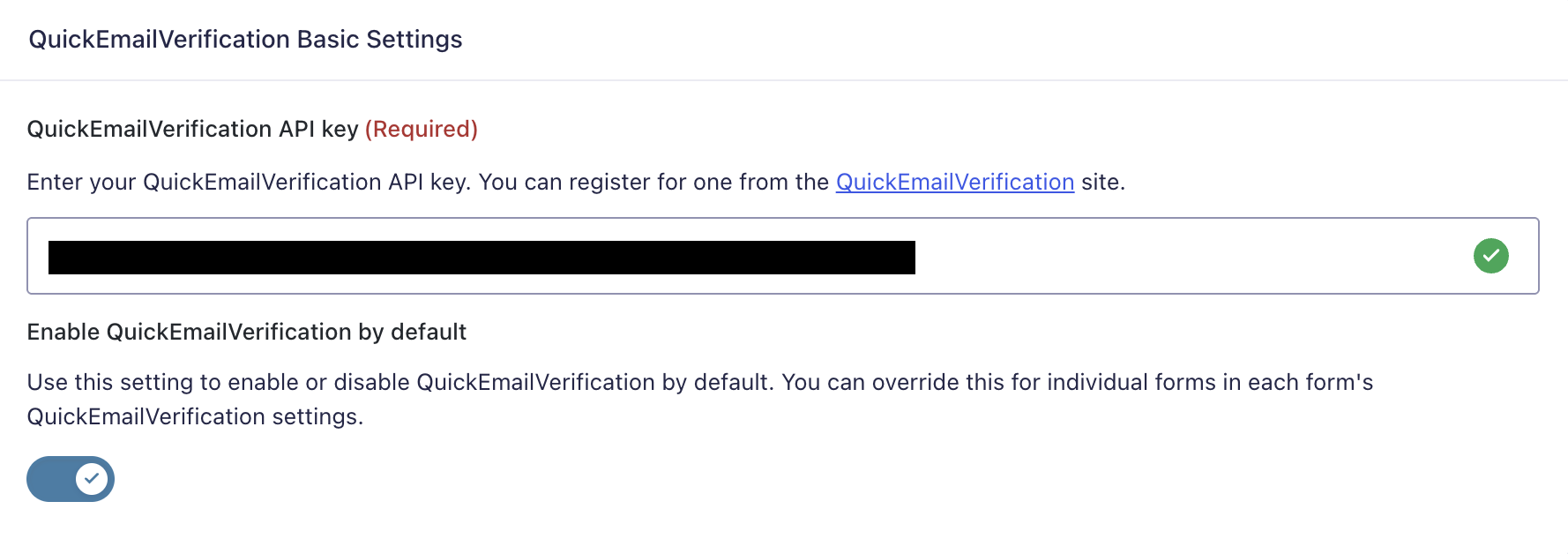
Enable QuickEmailVerification by Default
Controls whether verification is enabled for forms unless a form explicitly overrides the setting.
Domains Blocklist
A site-wide list of blocked email domains, one domain per line.
Notes:
- domains must be lowercase
- each line must contain a valid domain
- blocked domains are rejected before the API request is made
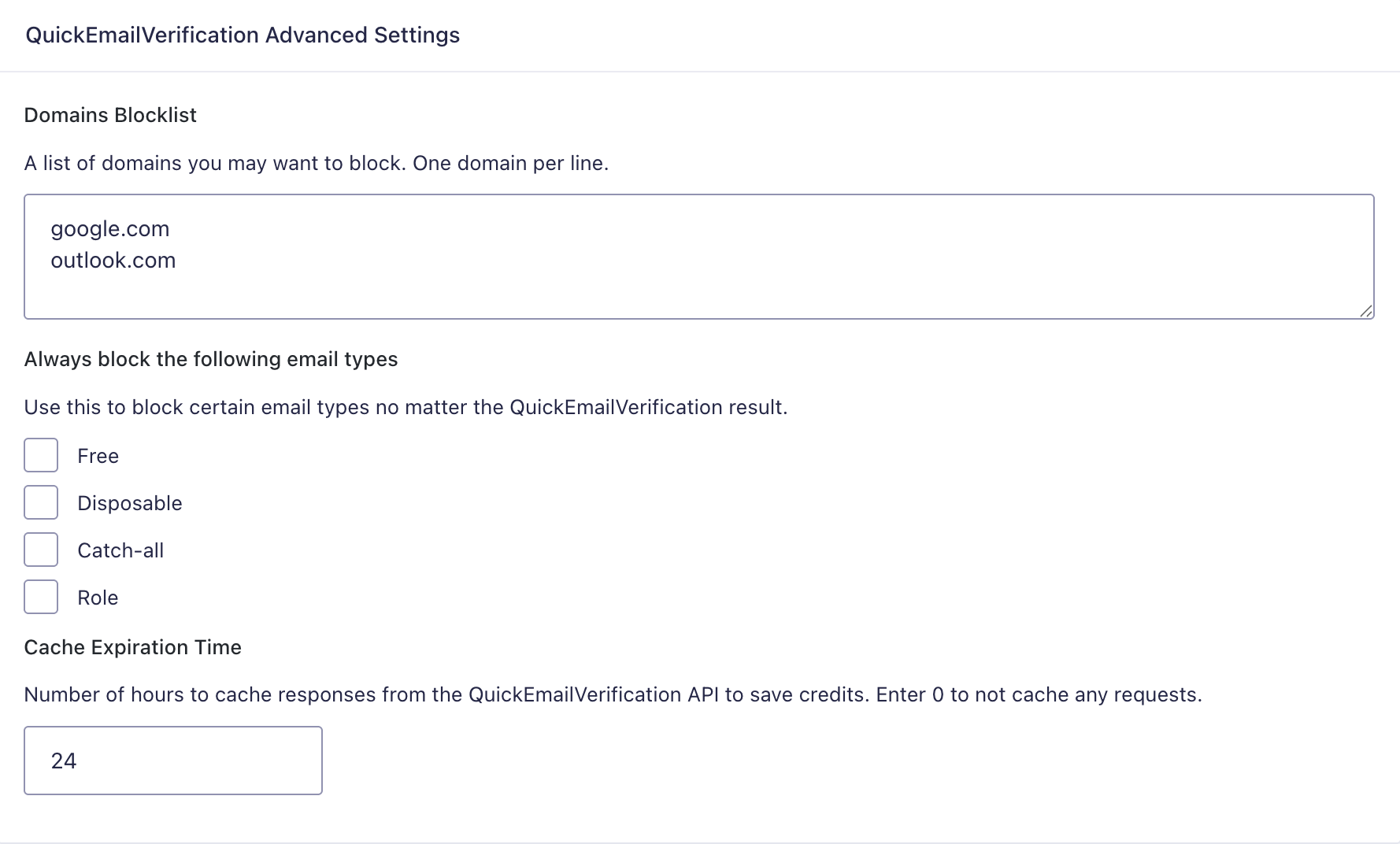
Always Block the Following Email Types
Optionally reject email addresses flagged by QuickEmailVerification as:
- Free
- Disposable
- Catch-all
- Role
These checks can block an address even if the API response is otherwise considered valid.
Cache Expiration Time
The number of hours to cache successful verification responses.
- Enter
0to disable caching - Default:
24
Per-Form Settings
Location:
Form Settings → QuickEmailVerification
Available settings
Enable QuickEmailVerification for this form
Turns verification on or off for an individual form.
Behavior:
- if the form has its own setting saved, that setting is used
- otherwise, the plugin falls back to the global default setting
How Validation Works
When a form is submitted, the add-on checks each Email field that is being validated.
Validation flow:
- Skip verification if the field is empty, already invalid, or not an Email field
- Skip verification if no API key is configured
- Skip verification if the add-on is disabled for that form
- If email confirmation is enabled, validate the primary email input
- Extract the email domain
- Check the domain against the global blocklist
- If the domain is blocked, fail validation immediately
- Otherwise, call the QuickEmailVerification API
- If configured, block addresses flagged as free, disposable, catch-all, or role-based
- If the API result is not
valid, fail validation
Save and Continue Behavior
The add-on also checks email validity during Save and Continue.
This prevents users from saving partial entries with email addresses that are:
- blocklisted by domain
- blocked by configured email type rules
- reported as invalid by QuickEmailVerification
If verification fails during Save and Continue, the partial submission is aborted.
Email Types That Can Be Blocked
The add-on can block the following QuickEmailVerification flags:
freedisposableaccept_all(catch-all)role
This allows administrators to enforce stricter email quality requirements than the API verdict alone.
Domain Blocklist Rules
The blocklist is global and applies before any API request is sent.
Rules:
- one domain per line
- domains must be lowercase
- each entry must be a valid hostname-style domain
- exact domain matching is used
Example:
mailinator.com
tempmail.example
example.org
Caching
To reduce API usage, successful live verification responses can be cached using WordPress transients.
Details:
- cache key is based on the email address
- cache duration is set in hours
- caching applies to live verification requests
- sandbox key validation is cached separately for a short time
Validation Messages
If verification fails, the field is marked invalid.
Default failure cases include:
- blocked email provider/domain
- blocked email type
- failed email verification result
If a custom Gravity Forms field error message is configured, that message is used instead of the default add-on message.