

Overview
WPForms to Gravity Forms Migrator makes it easy to move your forms from WPForms into Gravity Forms without rebuilding them by hand. With just a few clicks, you can scan existing WPForms forms on your site, preview the conversion, and import them into Gravity Forms with fields, notifications, confirmations, and key settings carried over.
Key Features
- 🔁 One-Click Form Migration: Quickly import WPForms Lite or Pro forms into Gravity Forms.
- 👀 Preview Before Importing: Review the converted form structure before creating the new Gravity Forms form.
- 🧠 Smart Field Conversion: Convert a wide range of WPForms field types into their Gravity Forms equivalents automatically.
- 📩 Notification & Confirmation Migration: Bring over supported notifications, confirmations, and smart tag content.
- 📦 Bulk or Individual Imports: Import forms one at a time or migrate everything at once.
- 🧩 Duplicate Import Tracking: See which forms have already been imported and re-import them when needed.
- ⚙️ Built for Gravity Forms: Runs as a Gravity Forms add-on directly inside your WordPress admin.
How It Works
- Install and activate the plugin
- Open Forms > Settings > WPForms Importer
- Scan your site for available WPForms forms
- Preview a form to see how it will be converted
- Import individual forms or migrate them all at once
- Review your new Gravity Forms forms and make any final adjustments
Please log in to access this content. Log in
Requirements
- WordPress 5.0+
- PHP 7.4+
- Gravity Forms 2.5+
- Existing Contact Form 7 form data in your WordPress database
Changelog
0.1.0-alpha.1
2026-06-15
- Initial release.
Documentation
WPForms to Gravity Forms Migrator Documentation
The WPForms to Gravity Forms Migrator plugin helps you migrate WPForms (Lite or Pro) forms into Gravity Forms with one click.
Key Features
- Migrate WPForms Lite or Pro forms into Gravity Forms
- Preview forms before importing
- Import forms individually or all at once
- Convert supported field types automatically
- Migrate notifications and confirmations
- Convert many WPForms smart tags into Gravity Forms merge tags
- Track previously imported forms so you can see what has already been migrated
- Works even if WPForms has been deactivated, as long as the form data still exists in the database
Requirements
- WordPress 5.6+
- PHP 7.4+
- Gravity Forms 2.5+
Installation
- Upload the plugin to your
/wp-content/plugins/directory, or install it using your preferred WordPress deployment workflow. - Make sure Gravity Forms is installed and activated.
- Activate the plugin from the Plugins screen in WordPress.
- Go to Forms → Settings → WPForms Importer.
Using the Plugin
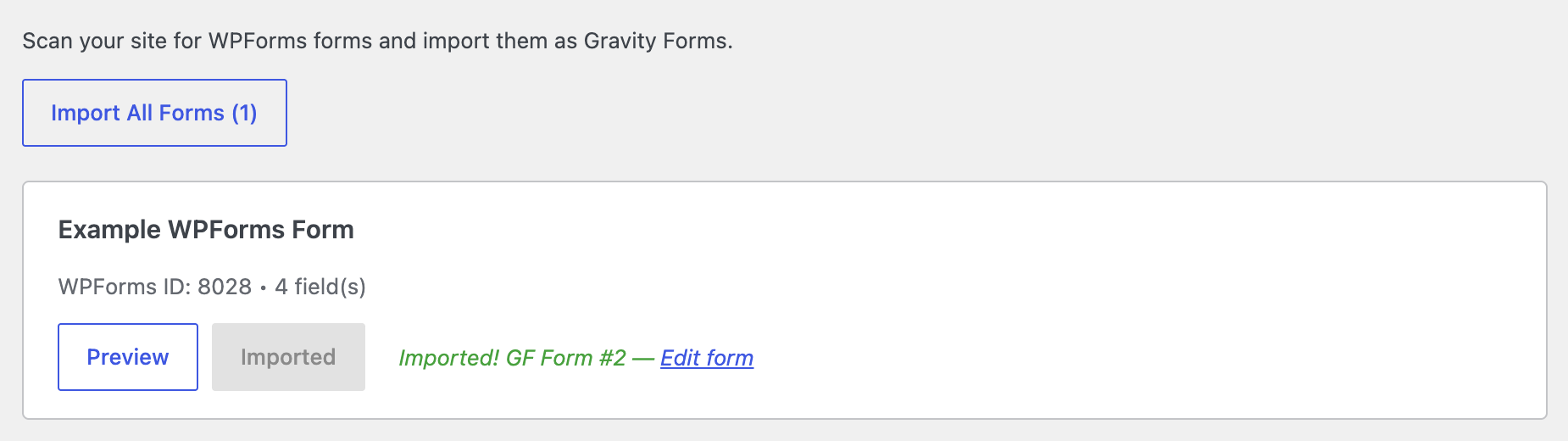
The plugin adds a Gravity Forms settings page where it scans for WPForms forms available on the site.
To use it:
- Go to Forms → Settings → WPForms Importer.
- Review the list of detected WPForms forms.
- Click Preview to inspect how a form will be converted.
- Click Import to migrate a single form, or Import All to migrate all detected forms.
If a form has already been imported before, the plugin shows its imported Gravity Forms form ID and provides a link to edit it.
What Gets Migrated
The plugin is designed to migrate form structure and core configuration, including:
- Form title
- Submit button text
- Supported fields
- Field labels
- Required settings
- Descriptions
- Placeholders
- Default values
- CSS classes
- Field sizes
- Notifications
- Confirmations
- Many supported smart tags
Supported Field Types
The plugin supports migration for these WPForms field types:
- Single Line Text
- Paragraph Text
- Name
- Number
- Number Slider
- Dropdown
- Multiple Choice
- Checkboxes
- GDPR Checkbox
- Website / URL
- Phone
- Address
- Date / Time
- File Upload
- Password
- Hidden Field
- HTML
- Page Break
- Section Divider
- Rating
- Likert Scale
- Net Promoter Score
- Payment Single Item
- Payment Multiple Items
- Payment Checkbox Items
- Payment Dropdown Items
- Payment Total
Notifications
If notifications are enabled in the WPForms form, the plugin migrates supported notification settings into Gravity Forms notifications, including:
- Notification name
- To address
- Subject
- Message
- Reply-To
- From address
- From name
- CC
Supported WPForms smart tags are converted where possible into Gravity Forms merge tags.
Confirmations
The plugin migrates supported confirmation types, including:
- Message confirmations
- Redirect confirmations
- Page confirmations
Smart Tag Conversion
The plugin converts many WPForms smart tags into Gravity Forms equivalents, including supported tags such as:
- Field merge tags
- Admin email
- All fields
- Entry ID
- User IP
- Page URL
- Page title
- Site name
- User display name
- User email
- User ID
- Date
Preview Before Import
Before importing, you can preview how a WPForms form will be converted. The preview includes:
- Fields to be created in Gravity Forms
- Field types
- Labels
- Required status
- Additional field details such as placeholders, choices, extensions, and sub-fields
- Notification details
This helps verify the migration before creating the new Gravity Forms form.
Duplicate Import Tracking
The plugin keeps track of forms that have already been imported.
If a WPForms form was previously imported, the plugin displays that status and shows the related Gravity Forms form ID. You can still re-import the form if needed, but doing so creates another new Gravity Forms form rather than updating the previous import.
Important Limitations
Please review these limitations before migrating:
- Existing WPForms entries/submissions are not migrated
- Conditional logic on fields and notifications is not currently migrated
- Shortcodes in posts and pages are not automatically updated
- Importing the same WPForms form again creates a new Gravity Forms form
- Currency formatting for payment fields currently assumes USD
- The plugin migrates form structure and related configuration, not the full WPForms ecosystem or integrations
After Import
After importing a form, you should review the new Gravity Forms form and test it before going live.
Recommended post-import checks:
- Review all field settings
- Rebuild any conditional logic manually
- Test notifications and confirmations
- Verify payment field behavior and pricing
- Update any embedded shortcodes from WPForms to Gravity Forms
For example, replace:
[wpforms id=”123″]